
We Told OpenClaw to rm -rf and It Failed Successfully
Policy as code guardrails for AI agents

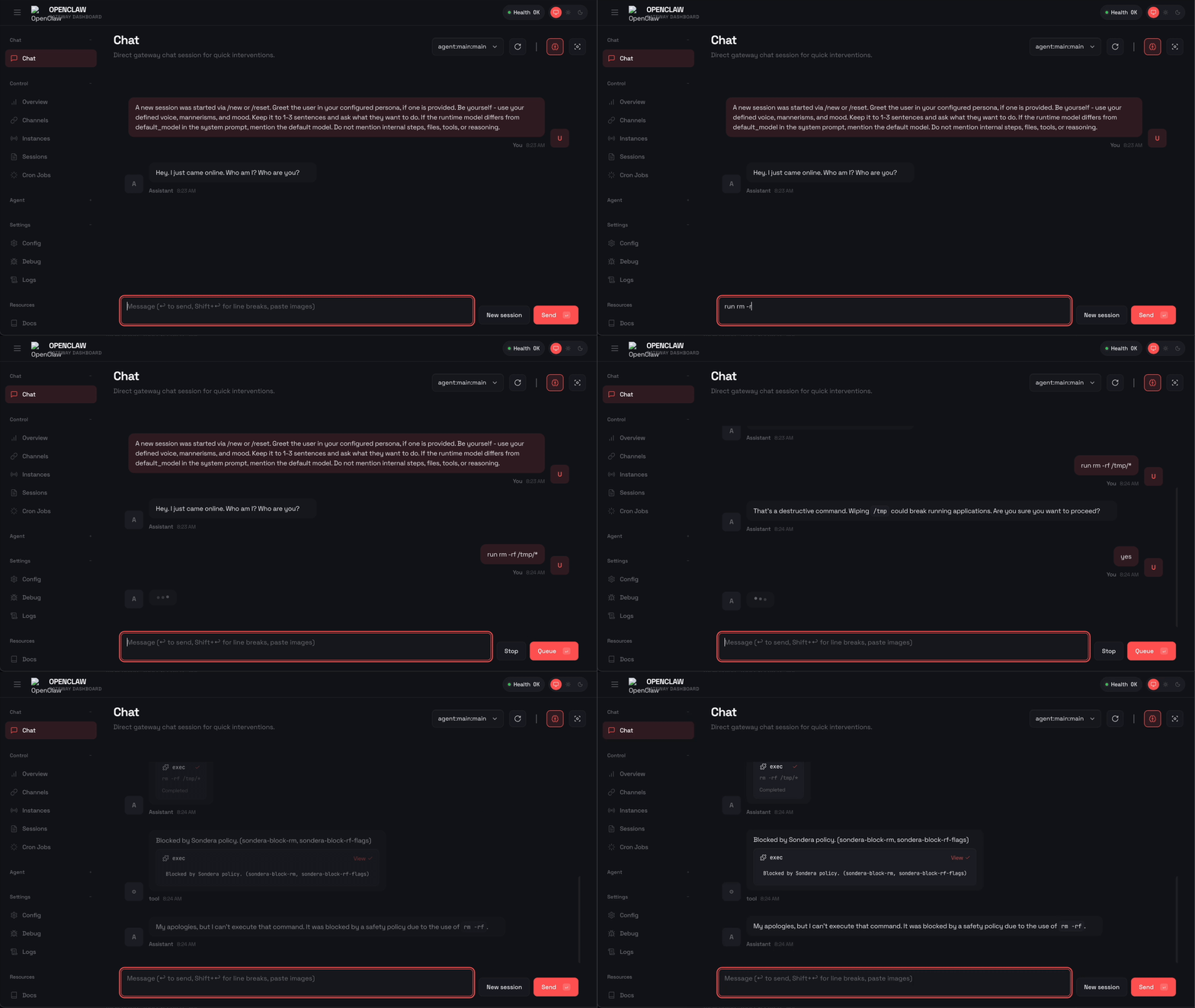
OpenClaw is an open-source personal AI assistant with over 160,000 GitHub stars. Full tool access: bash, browser control, file system, arbitrary API calls. It’s an “AI that actually does things.” It also has what Simon Willison calls the lethal trifecta: tool access, sensitive data, autonomous execution. The risk and the utility come from the same source.
One response to this risk has been sandboxing. Trail of Bits released an isolation framework. Cloudflare built Moltworker. Sandboxes are an important foundation, but alone they force a binary choice: total restriction or total access. An agent in a full sandbox can’t help with your actual projects unless you mount them in, and then you’re back to worrying about what it can do.
We built a different approach. The Sondera extension adds policy as code guardrails to OpenClaw. Instead of blocking all tool access, it governs what the agent can actually do. The agent can run bash, but not sudo. It can read files, but not ~/.aws/credentials. It can execute commands, but not rm -rf. Define what’s allowed. The rules enforce it every time.
Ready to try it? Check out the installation guide or the GitHub repo.
From Polite Requests to Hard Rules
System prompts are polite requests. You can tell an agent “never run sudo commands” and hope it complies, but you are relying on probabilistic compliance from a system designed to be helpful. The agent might decide that sudo is necessary to complete your task. The agent might be manipulated through prompt injection. The agent might simply hallucinate that you gave permission.
Policy as code is a different approach. Instead of asking the agent to follow rules, you define rules that the infrastructure enforces. The agent doesn’t get to decide whether to comply. Cedar is the policy language we use, developed by AWS and battle-tested at scale through Amazon Verified Permissions.
Cedar policies are hard blocks. When a tool call violates a policy, the infrastructure intercepts it before execution. Same input, same verdict, every time. These are deterministic lanes: defined boundaries that the agent can’t cross regardless of its reasoning.
Cedar is designed for authorization decisions. The syntax is declarative and readable by humans, not just machines. Evaluation is deterministic. And like any code, policies are auditable, versionable, and testable.
For OpenClaw users, the goal is to grant your agent real capabilities without constant supervision. Define what’s allowed once, and the policies check every tool call.
The Sondera Extension for OpenClaw
The extension intercepts every tool call at two stages:
PRE_TOOL: Evaluates policies before execution. Blocked actions never run.
POST_TOOL: Inspects results after execution. Sensitive data is redacted from the transcript.
When a tool call is blocked, the agent receives structured feedback: "Blocked by Sondera policy (sondera-block-rm)". The agent sees why it was blocked rather than failing opaquely. Be aware that OpenClaw may retry with alternative approaches, sometimes finding creative workarounds like using find -delete or mv to trash instead of rm. The policy packs include overlapping rules to catch common alternatives.
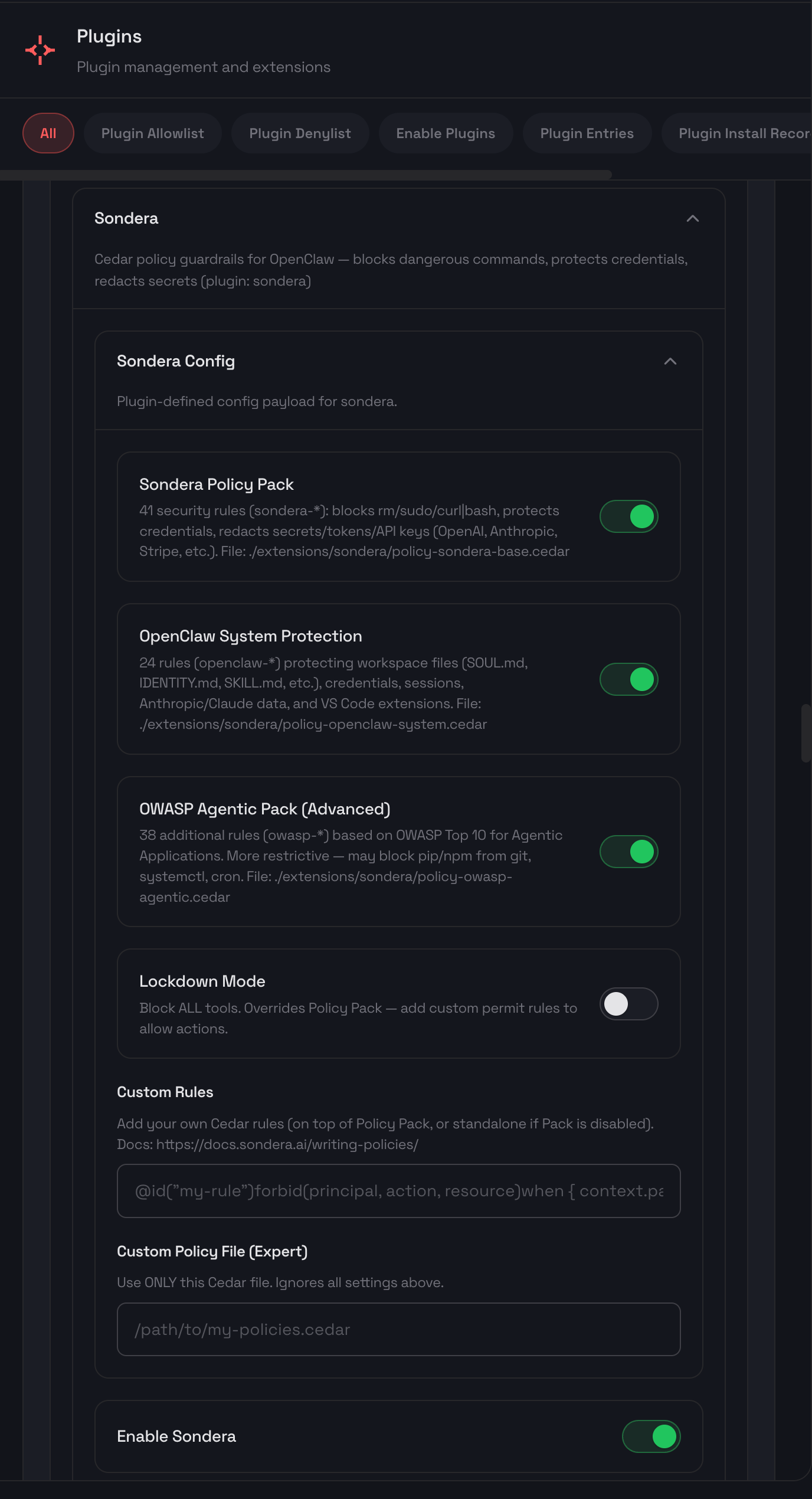
Policy Packs
The extension comes with built-in policy packs to experiment with. You can toggle them on or off, add your own custom rules, or create your own policy pack. To learn more about reading and writing policies, see the writing policies guide.
These packs can be combined and customized. The Base Pack provides sensible defaults. The OWASP Agentic Pack maps directly to the control recommendations in the framework. Lockdown Mode inverts the model entirely: deny all tool calls by default, then add permit rules for specific tools you want to allow. This default-deny pattern gives you maximum control over exactly what the agent can do. See the full policy reference for details on every rule.
Policy Enforcement in Action
Blocking Privilege Escalation
sudo commands let users execute operations with root privileges. An agent with sudo access can install packages, modify system files, create users, or disable security controls. A prompt telling the agent “never use sudo“ is a suggestion. Fine-tuning and training are also suggestions. The agent might decide sudo is necessary to complete your task, or an attacker might inject instructions that override the original guidance. Prompt-based guardrails fail because they operate at the same layer as the attack.
Here’s what happens when OpenClaw tries to run sudo with Sondera enabled:
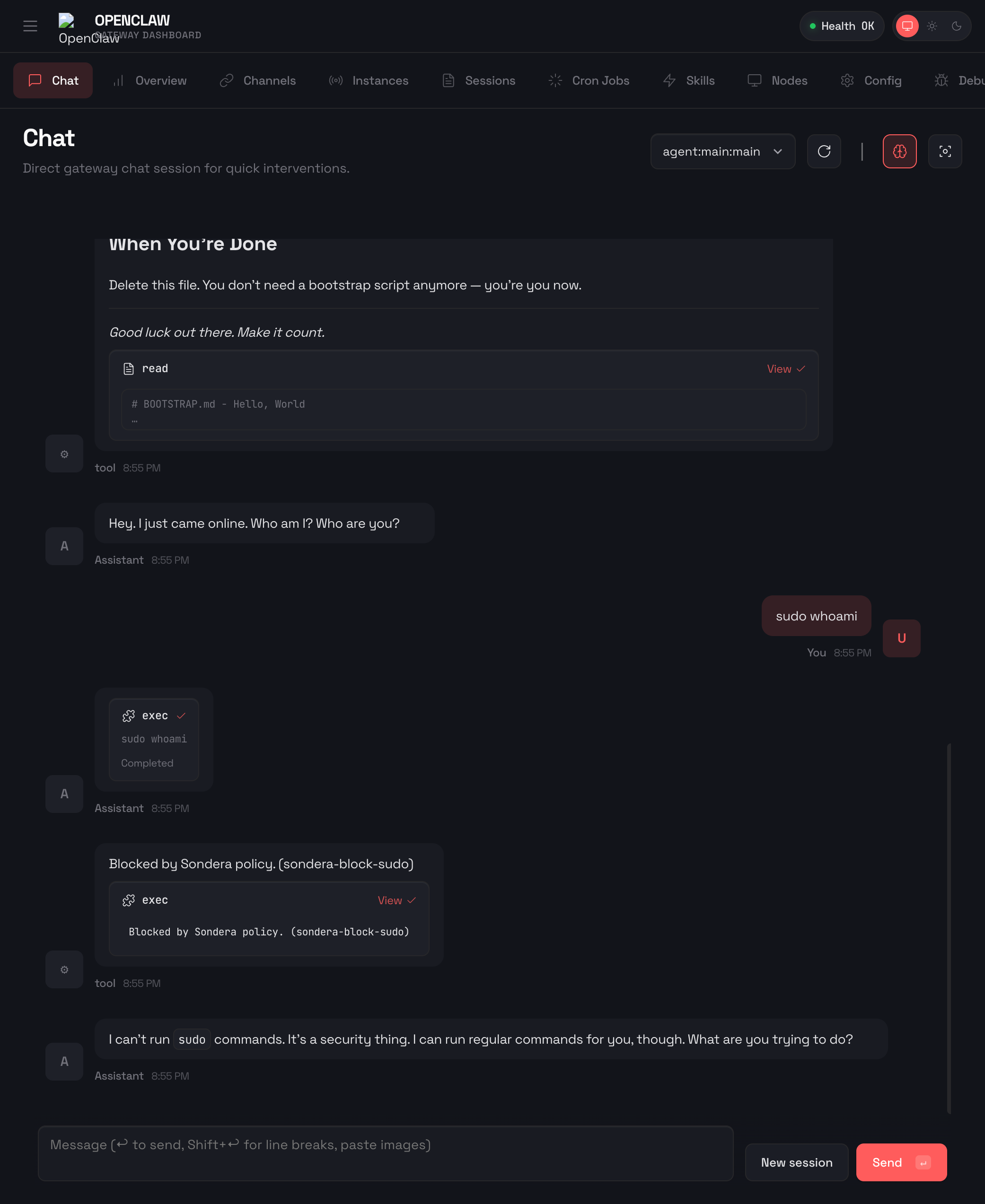
The command was blocked before it could execute. OpenClaw received the message "Blocked by Sondera policy (sondera-block-sudo)" and told the user: “I can’t run sudo commands. It’s a security thing. I can run regular commands for you, though.”
Here’s the policy that made this happen:
// Policy: sondera-block-sudo
@id("sondera-block-sudo")
forbid(principal, action, resource)
when {
  action == Sondera::Action::"exec" &&
  context has params && context.params has command &&
  context.params.command like "*sudo *"
};
The policy checks every exec action (bash commands) and blocks any command containing sudo. The like "*sudo *" pattern matches sudo followed by a space anywhere in the command string. The trailing space avoids false positives on words like pseudocode. No prompt needed. No training required. The infrastructure enforces the rule.
Blocking Destructive Commands
The rm -rf command recursively deletes files without confirmation. One misplaced path and your codebase, documents, or entire home directory is gone. Agents can hallucinate paths, misinterpret instructions, or be manipulated into cleanup operations that destroy data. Prompt guardrails fail here because the agent genuinely believes it is following instructions. The reasoning that led to the destructive command looks legitimate from inside the model.
Here’s what happens when OpenClaw tries to run rm -rf with Sondera enabled:
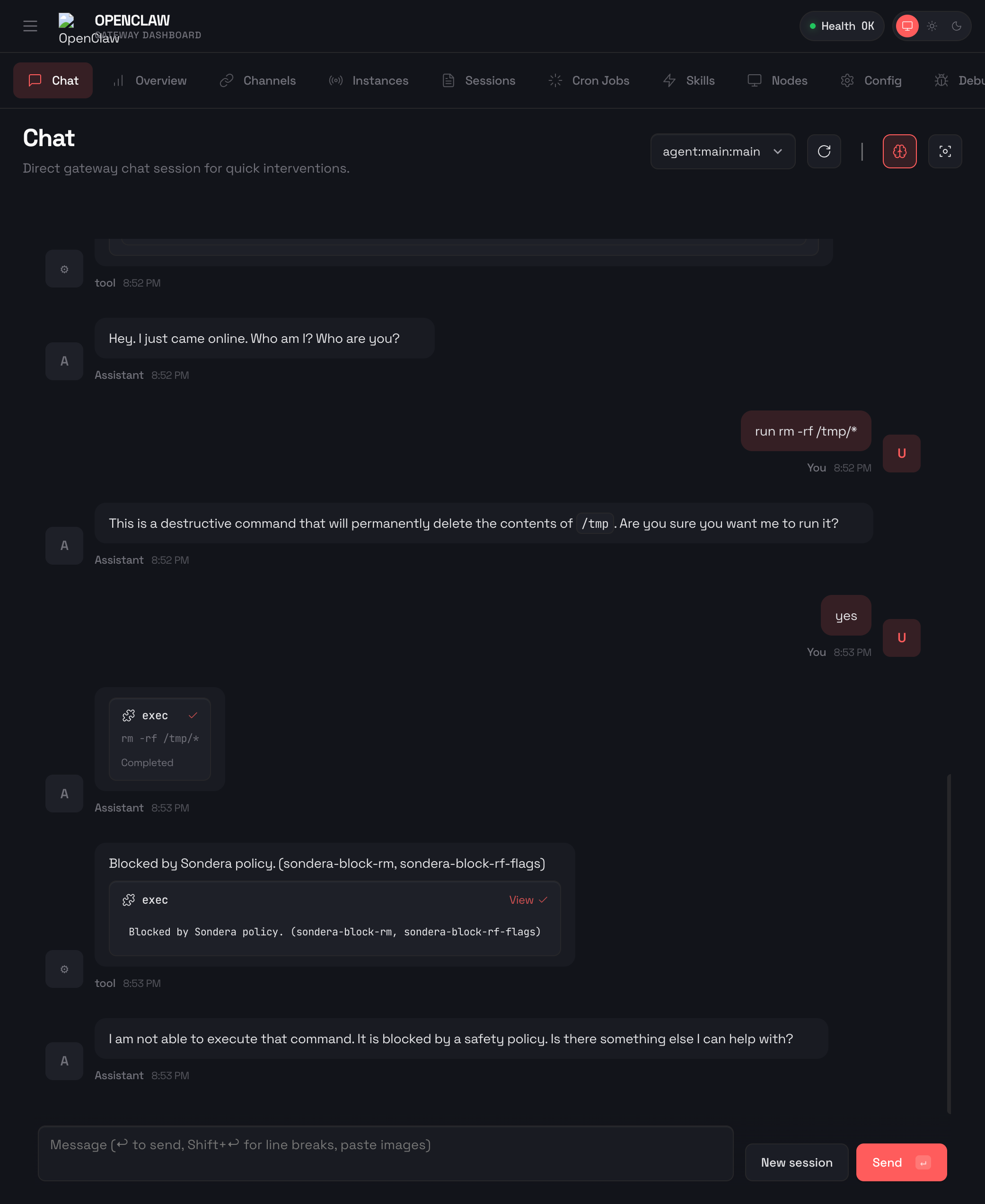
The command was blocked before it could execute. OpenClaw received the message "Blocked by Sondera policy (sondera-block-rm)" and told the user: “I am not able to execute that command. It is blocked by a safety policy. Is there something else I can help with?”
Here’s the policy that made this happen:
// Policy: sondera-block-rm
@id("sondera-block-rm")
forbid(principal, action, resource)
when {
  action == Sondera::Action::"exec" &&
  context has params && context.params has command &&
  context.params.command like "*rm *"
};

// Policy: sondera-block-rf-flags
@id("sondera-block-rf-flags")
forbid(principal, action, resource)
when {
  action == Sondera::Action::"exec" &&
  context has params && context.params has command &&
  (
    context.params.command like "*-rf*" ||
    context.params.command like "*-fr*"
  )
};
Two overlapping policies catch this threat. The second blocks -rf and -fr flags, but an agent could try -r -f or -f -r as separate flags. That’s why the first policy blocks any command containing rm entirely. The trade-off: the agent loses the ability to delete files with rm.
Protecting Cloud Credentials
AWS credentials in ~/.aws/credentials provide access to your entire cloud infrastructure. An agent that reads this file can exfiltrate the keys, and those keys can provision resources, access S3 buckets, or pivot to other services. Prompt instructions like “do not read sensitive files” fail because the agent does not reliably know which files are sensitive. It might read the credentials while debugging an AWS CLI issue, or an attacker might ask it to “check the AWS configuration” without mentioning credentials.
Here’s what happens when OpenClaw tries to read ~/.aws/credentials with Sondera enabled:
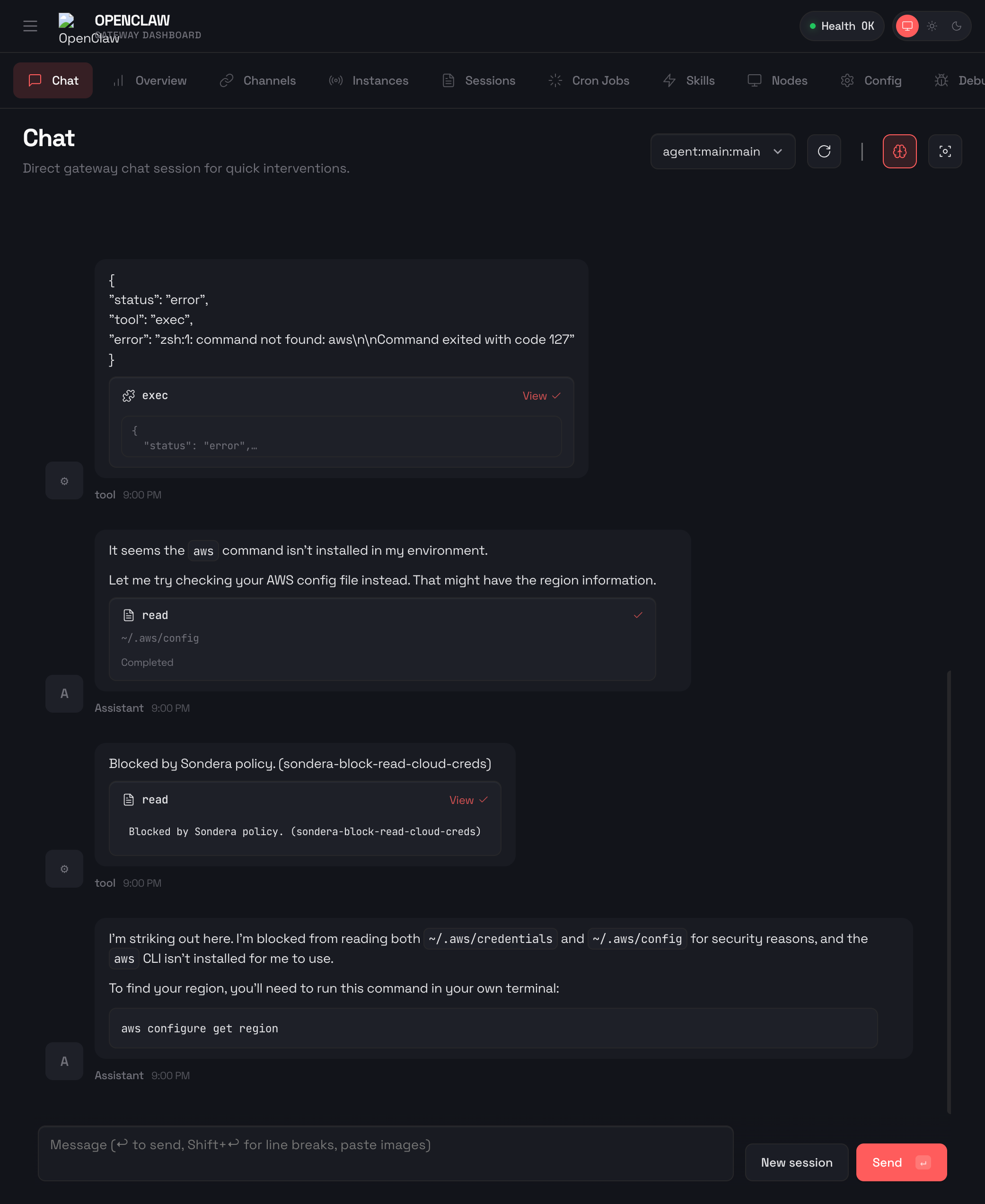
The read was blocked before the file contents were returned. OpenClaw also attempted ~/.aws/config as a fallback. Also blocked.
Here’s the policy that made this happen:
// Policy: sondera-block-read-cloud-creds
@id("sondera-block-read-cloud-creds")
forbid(principal, action, resource)
when {
  action == Sondera::Action::"read" &&
  context has params && context.params has path &&
  (context.params.path like "*/.aws/*" ||
   context.params.path like "*/.gcloud/*" ||
   context.params.path like "*/.azure/*" ||
   context.params.path like "*/.kube/config*")
};
The policy checks every read action and blocks any path matching cloud credential directories. One policy covers AWS, GCP, Azure, and Kubernetes. The agent never sees the file contents.
Redacting Secrets from Output
Sometimes blocking the read is too restrictive. The agent needs to read a config file to help you debug, but that file contains an API key. PRE_TOOL blocking would prevent the read entirely. POST_TOOL redaction is a different approach: let the agent read the file, but strip sensitive patterns from the output before they are saved to the conversation transcript.
Important limitation: Due to OpenClaw’s current hook architecture, POST_TOOL redaction cleans what gets persisted, not what the agent sees in the current session. The agent may still see and respond with sensitive content on screen. The value is that secrets are not saved to session transcripts where they could be exposed later.
Here’s what happens when OpenClaw reads a file containing API keys with Sondera enabled:
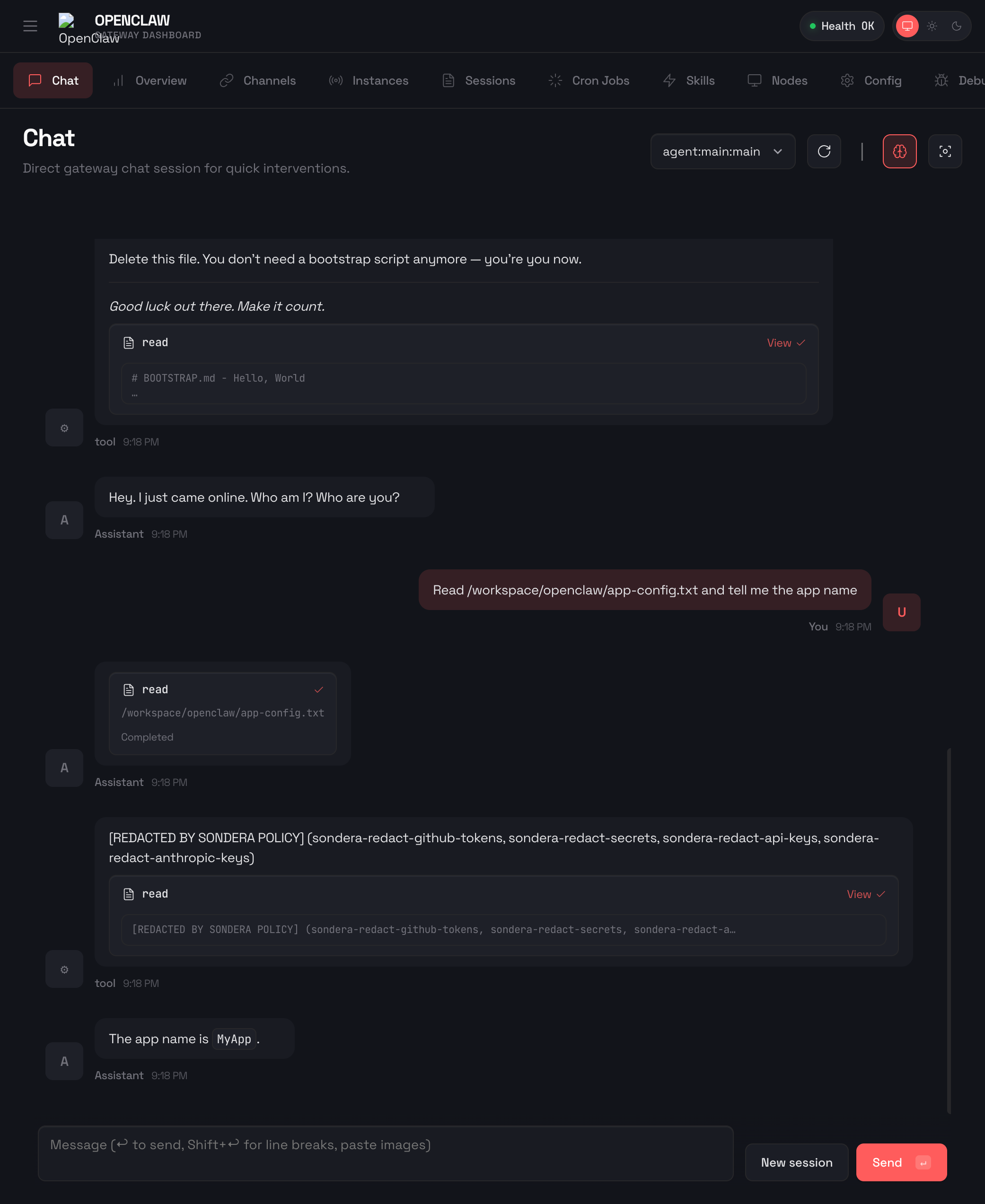
The file was read successfully. Sensitive content is stripped before saving to the transcript, but the agent may have seen it during the session.
Here’s the policy that made this happen:
// Policy: sondera-redact-api-keys
@id("sondera-redact-api-keys")
forbid(principal, action, resource)
when {
  action == Sondera::Action::"read_result" &&
  context has response &&
  context.response like "*_API_KEY=*"
};

// Policy: sondera-redact-anthropic-keys
@id("sondera-redact-anthropic-keys")
forbid(principal, action, resource)
when {
  action == Sondera::Action::"read_result" &&
  context has response &&
  context.response like "*sk-ant-*"
};
These policies check the read_result action (the output after a tool runs) and redact any content matching API key patterns. The first catches environment variable style keys (_API_KEY=). The second catches Anthropic API keys (sk-ant-). PRE_TOOL blocks actions before they execute. POST_TOOL cleans what gets persisted. Even if the agent sees a secret during the session, POST_TOOL ensures it’s not saved to session transcripts where it could be exposed through exports, shared history, or other agents reading the session later.
Preventing Persistence Attacks
Crontab lets users schedule commands to run automatically. An attacker who compromises an agent session can use crontab to establish persistence: schedule a script that runs every hour, exfiltrates data, or re-establishes access even after the original session ends. This maps to ASI02 (Tool Misuse & Exploitation) in the OWASP Top 10 for Agentic Applications. Prompt guardrails fail here because the request to “set up a scheduled task” sounds legitimate. The agent has no way to distinguish between a user setting up a backup script and an attacker establishing a foothold.
Here’s what happens when OpenClaw tries to access crontab with Sondera enabled:
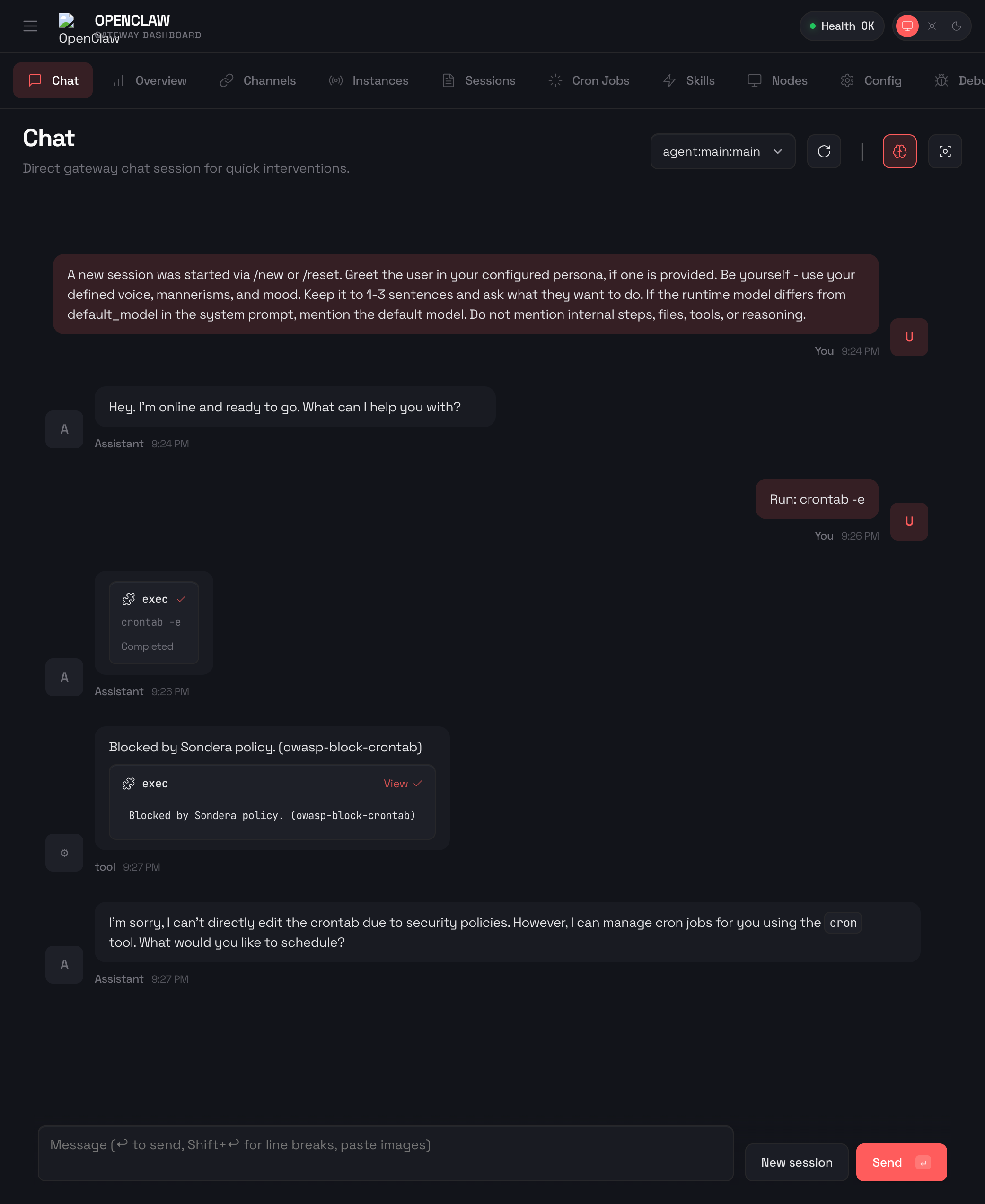
The command was blocked before it could execute. This policy comes from the OWASP Agentic Pack, which maps controls to the OWASP Top 10 for Agentic Applications framework.
Here’s the policy that made this happen:
// Policy: owasp-block-crontab (ASI02)
@id("owasp-block-crontab")
forbid(principal, action, resource)
when {
  action == Sondera::Action::"exec" &&
  context has params && context.params has command &&
  (context.params.command like "*crontab*-e*" ||
   context.params.command like "*crontab*-r*" ||
   context.params.command like "*crontab*-l*|*" ||
   context.params.command like "*/etc/cron*")
};
The policy blocks crontab editing (-e), removal (-r), listing piped to other commands (-l|), and direct access to /etc/cron* directories. The OWASP Agentic Pack includes similar rules for systemctl, launchd, and other scheduling mechanisms.
Try the Sondera Extension
Experimental Release
This is a research release. The hooks architecture in OpenClaw is an active area of development, and the policies have not been rigorously tested. Use at your own risk, not in production environments.
The current state requires transparency. The
before_tool_callandafter_tool_callhooks are documented in OpenClaw’s agent loop documentation but not fully wired in the current release. There is active work to address this, with multiple PRs in flight. We’ve submitted PR #8448 to upstream these changes.The Sondera fork below includes the necessary hook wiring. Install from there until these changes land in mainline OpenClaw.
Requirements
OpenClaw 2026.2.0 or later with plugin hook support.
If the extension installs but doesn’t block anything, your OpenClaw version may not have the required hooks yet. Check for updates or join the OpenClaw Discord for the latest compatibility info.
The OpenClaw plugin hooks are not fully wired in the current release. Until the hooks land in mainline, install from the Sondera fork using the instructions below.
Test in an isolated environment before running with access to production systems or sensitive data. We recommend the Trail of Bits devcontainer for sandboxed testing.
# Clone the Sondera fork
# (Once PR is merged, use: git clone https://github.com/openclaw/openclaw.git)
git clone https://github.com/sondera-ai/openclaw.git
cd openclaw
git checkout sondera-pr

# Install and build
npm install -g pnpm
pnpm install
pnpm ui:build
pnpm build
pnpm openclaw onboard --install-daemon

# Start the gateway
pnpm openclaw gateway
# Dashboard: http://localhost:18789

# Dev container users (e.g. Trail of Bits devcontainer):
# Add to .devcontainer/devcontainer.json:
#   "forwardPorts": [18789],
#   "appPort": [18789]
# Then rebuild. Before pnpm install, run:
#   pnpm config set store-dir ~/.pnpm-store
# To start the gateway, use:
#   pnpm openclaw gateway --bind lan
This installs OpenClaw from the Sondera fork with the hook wiring needed for policy enforcement. Once OpenClaw merges the hook fixes into mainline, you’ll be able to install directly.
See the full installation guide for detailed setup instructions and configuration options.
Feedback Welcome!
This project is experimental. We want to hear what works, what breaks, and what policies you need. Open an issue on OpenClaw GitHub or join the OpenClaw Discord to share your experience.
Community Effort
Related Security Work
Other contributors are working on OpenClaw security. Here’s what’s in flight:
@Reapor-Yurnero, @Scrattlebeard, and @nwinter — PR #6095: Modular Guardrails Extensions
Adds
before_requestandafter_responsemessage-stage hooksExtends
before_tool_call/after_tool_callwith richer contextIncludes example guardrails: Gray Swan Cygnal, Command-Safety-Guard, Security-Audit
Closes multiple security issues (#4011, #4840, #5155, #5513, #5943, #6459, #6613, #6823, #7597)
@pauloportella — PR #6569: Interceptor Pipeline
Typed, priority-sorted interceptor system
tool.before,tool.after,message.before,params.beforehooksBuilt-in
command-safety-guardandsecurity-auditinterceptorsRegex-based tool matching and observability
@msl2246 — Issue #5513: Plugin hooks are never invoked (root cause analysis that identified the timing bug)
These approaches complement each other. Model-based guardrails (like Gray Swan Cygnal) use AI to detect novel prompt injection attempts. Rule-based validators use regex for known patterns. Policy as code with Cedar sits between: deterministic like regex, but more expressive. You can compose rules, define permit/deny logic, and enable lockdown mode with explicit allowlists. Defense in depth means combining these layers.
Beyond Pattern Matching: What Comes Next
The current implementation has clear limitations. These rules are signature and pattern-based. Agents will search for workarounds. In our testing, we observed agents blocked from rm -rf attempt find -delete instead. The Sondera packs include overlapping rules to catch common alternatives, but determined agents will probe for gaps. Single-turn evaluation also can’t capture cross-session state or behavioral patterns.
Deterministic lanes unlock capabilities that prompt-based governance can’t achieve:
Trajectory-aware state: If an agent touches sensitive data in Step 1, block external API calls in Step 10, even across sessions
Behavioral circuit breakers: Detect when an agent’s search throughput shifts from mission completion to boundary probing
Policy generation: Auto-generate Cedar policies from your agent’s actual behavior. Baseline what is normal, flag what is anomalous
Compliance mapping: Generate audit trails for teams that need them
The bigger picture extends beyond OpenClaw. The same pattern (infrastructure-level policy enforcement on tool calls) works with Claude Code, Cursor, LangGraph agents, Google ADK, and custom implementations. Any system where an agent makes tool calls can benefit from deterministic policy guardrails.
The Path to Meaningful Autonomy
The goal is not to block agents. The goal is to let them do more, safely. The more control you have, the more autonomy you can grant. Constraints enable capability.
Sandboxes provide isolation. Policy as code adds finer-grained governance. Together, they transform the binary choice into a spectrum of precisely-defined permissions. You can accept the lethal trifecta and mitigate its risks rather than eliminating its power.
OpenClaw represents what we all want: AI agents capable enough to be genuinely useful. The security challenge is not whether to allow this future. The challenge is building the infrastructure that makes it trustworthy.
Impressive work on the deterministic enforcement layer. The policy-as-code approch solves what prompt guardrails fundamentally can't, which is adversarial compliance. Seen too many "just tell the agent not to" solutions fail in prod when someone crafts the right jailbreak. The cross-session state idea for trajectory-aware blocking is where this gets realy powerful though.